
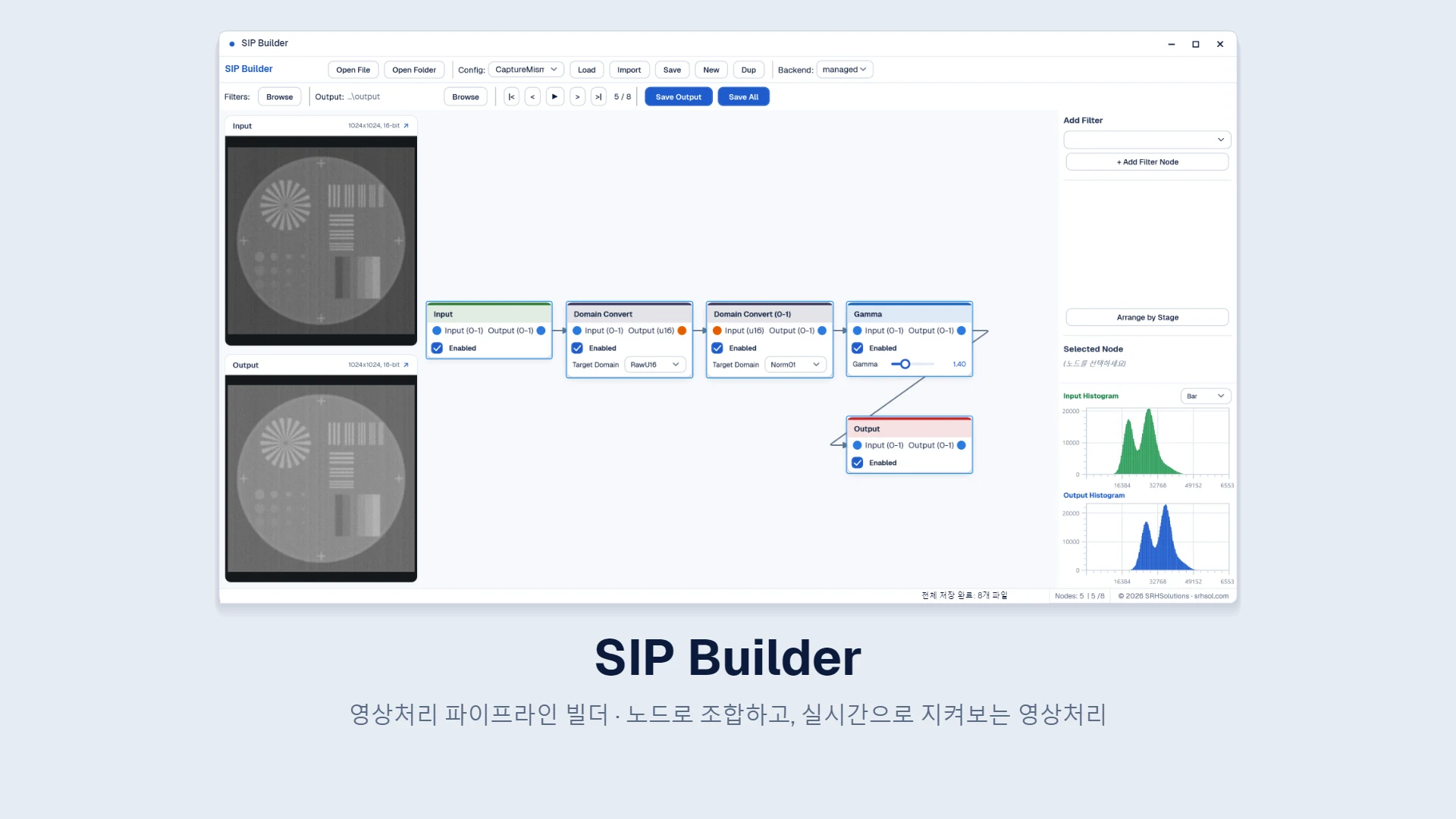
Solution overview
SIP Builder — a development tool for assembling image-processing filters as nodes and observing pipeline behavior in real time
SIP Builder is an image-processing pipeline builder developed by SRH. Connect filters as nodes and review results and distributions as you adjust parameters to design and tune a processing pipeline. It runs on the GPU using SRH’s image-processing engine, and saved configurations can be used directly for batch processing.
Key components
Node-based pipeline editing, pixel-domain connection validation and conversion nodes, immediate reprocessing and previews, input/output histograms, GPU filter execution, configuration storage, and folder-based batch processing
CAPABILITIES
Key capabilities
Compose filters with a node graph
Add filters as nodes and connect them to build a processing pipeline. Node colors identify filter categories, while port colors identify pixel domains. The graph can be arranged automatically by processing stage.
Connection validation
Incompatible pixel-domain connections trigger an immediate warning. Users can insert a conversion node at the connection to make the pipeline valid.
Immediate reprocessing and preview
Changing a parameter cancels the current processing run and starts a new one, updating input and output views immediately. The output image can also be opened in a separate, larger window.
Histograms and bypass
Compare input and output histograms to review distribution changes. Enable or bypass individual nodes to compare the effect of each filter.
GPU filter execution
Runs filters using GPU compute shaders while preserving 16-bit images throughout the pipeline. Processing status is displayed in the status bar.
Save configurations and process batches
Save and load processing configurations as JSON. Process frames by folder and save them as DICOM while retaining the original metadata.
PROJECT FACTS
Project specifications
- Editing
- Node graph · Pixel-domain connection validation
- Monitoring
- Immediate reprocessing · Input/output previews · Histograms
- Processing
- GPU compute shaders · 16-bit throughout
- Input/output
- DICOM · Metadata preservation · Folder-based batch processing
- Configuration
- JSON save and load
TECHNOLOGY
Technology
BUILD WITH SRH
Adoption and tailored implementation
We provide imaging equipment manufacturers and R&D teams with a SIP Builder environment for designing and tuning image-processing pipelines. We can tailor filters, processing configurations, and GPU execution environments to your equipment and image formats.
- Review processing requirements and image formats
- Design a pipeline in SIP Builder
- Implement and validate tailored filters and GPU processing
- Support deployment and operation
Tell us about your image formats and the processing and tuning capabilities you need.
Discuss adoptionLast updated